

Description
Nature Wallpapers for Chrome
Overview
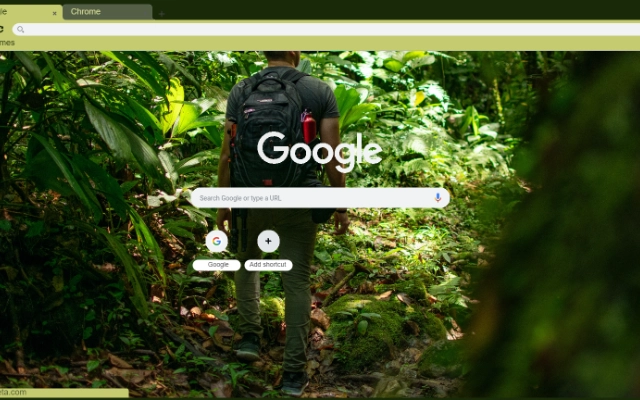
The Ecotourism is a desktop utility designed to enhance the visual experience of Chrome users by offering a curated selection of high-quality nature-themed wallpapers. This tool allows users to transform their browser’s background into immersive natural scenes, promoting a calming and visually engaging browsing environment. The software is intended for individuals seeking to improve digital wellbeing through aesthetic enhancements, particularly those who value eco-friendly digital experiences. It targets casual users, digital creatives, and environmentally conscious internet users who want to integrate nature into their daily digital routines. The application functions as a browser extension, directly integrating with Chrome to deliver seamless background changes. While the developer’s background is not specified, the tool focuses on selective, high-quality imagery that aligns with principles of digital mindfulness and environmental awareness. Real-world use cases include personalizing workspaces, reducing screen fatigue, and fostering a sense of connection to nature during prolonged online sessions.
Key Features & Capabilities
- Nature-Themed Wallpapers – Offers a rotating selection of high-resolution images showcasing forests, mountains, oceans, and wildlife, selected for visual quality and ecological authenticity.
- Chrome Integration – Seamlessly applies wallpapers directly to the Chrome browser’s background without requiring manual configuration.
- High-Quality Imagery – All visuals are optimized for clarity and detail, ensuring a crisp display across various screen resolutions.
- Minimal Resource Usage – Designed to operate efficiently with low impact on system performance, ideal for everyday browsing.
- Eco-Friendly Focus – Promotes digital wellbeing by encouraging mindful technology use through nature-inspired visuals.
These features support users in creating a more serene and inspiring digital workspace. For example, a remote worker might use the tool to reduce visual monotony during long work hours, while a student could benefit from a calming background during study sessions. The selective nature of the image curation ensures that only high-quality, non-repetitive visuals are displayed, enhancing user engagement without distraction.
User Interface, Workflow & Performance
The user interface is minimal and focused on functionality, with a straightforward setup process that requires no technical expertise. Once installed, the extension automatically applies the selected wallpaper, with optional settings to customize the rotation frequency or choose specific images. Navigation is intuitive, relying on standard browser extension controls accessible through the Chrome menu. The workflow is efficient, allowing users to apply a new background in seconds. Performance details were not specified by the developer, but the tool’s lightweight size of 2.1 MB suggests low system overhead. The application does not appear to consume significant CPU or RAM during operation, aligning with typical behavior for browser extensions of this type. Stability is expected to be consistent, as the software operates within Chrome’s secure extension environment. The developer did not provide additional performance metrics or resource usage data.
Compatibility & System Requirements
The Ecotourism is compatible with Windows, Mac, and Linux operating systems, making it accessible to a broad range of users. It is designed specifically for Chrome, ensuring full integration with the browser’s interface. The installation size is 2.1 MB, indicating a lightweight deployment. The developer did not specify exact system requirements, including minimum RAM, processor speed, or storage needs. Compatibility information was partially provided, with no mention of older Chrome versions or unsupported devices. Users are advised to ensure their system runs a current version of Chrome for optimal functionality. No hardware-specific dependencies were listed.
Pros and Cons
Pros
- High-quality, nature-focused wallpapers for visual enrichment
- Lightweight design with minimal system impact
- Easy integration with Chrome browser
- Supports digital wellbeing through eco-friendly design
- Free to use with no hidden costs
Cons
- No customization options for image selection were detailed
- Limited to Chrome browser only
- Exact update frequency or release schedule not disclosed
- No offline mode or download functionality mentioned
- Developer background not publicly available
FAQ Section
Is The Ecotourism compatible with all Chrome versions?
The software is designed for Chrome, but specific version compatibility was not provided by the developer. Users are advised to run the latest Chrome update for best results.
Is the software safe to install?
As a browser extension available through official channels, The Ecotourism is expected to be secure. However, users should only install it from verified sources to ensure integrity.
Can I use this tool offline?
There is no information indicating offline functionality. The extension likely requires an active internet connection to load and rotate wallpapers.
How often does the wallpaper update?
The update frequency for new images was not specified. Users may need to manually refresh or check for changes.
What type of license does this software use?
The software is free to use and distributed without cost. The license type was not explicitly stated.
Final Thoughts + CTA
The Ecotourism delivers a simple yet meaningful enhancement to the Chrome browsing experience by introducing high-quality nature imagery into the digital environment. Its focus on visual clarity, eco-friendly themes, and minimal resource usage makes it a compelling choice for users seeking a more mindful and aesthetically pleasing online presence. While limited in customization and browser scope, its strengths lie in ease of use, visual appeal, and alignment with digital wellbeing principles. This tool is ideal for casual users, remote workers, and nature enthusiasts who value a serene digital workspace. With no cost and a lightweight footprint, it offers accessible value. Download The Ecotourism for Chrome now.
Guides & Tutorials for The Ecotourism Theme for Chrome
How to install The Ecotourism Theme for Chrome
- Click the Preview / Download button above.
- Once redirected, accept the terms and click Install.
- Wait for the The Ecotourism Theme for Chrome download to finish on your device.
How to use The Ecotourism Theme for Chrome
This software is primarily used for its core features described above. Open the app after installation to explore its capabilities.
User Reviews for The Ecotourism Theme for Chrome 0
No reviews found





